Workflows
ApertureDB AI Workflows provide a way to automate the execution of a commonly-performed task, when managing multimodal datasets for AI. They are structured sequences of operations designed to solve common AI/ML tasks like multimodal data ingestion, search, data correlation, or metadata filtering, using graph, vector, and multimodal-native capabilities offered by ApertureDB paired sometimes with models or services provided by partner tools. These workflows are designed to be easy to use and can be customized to fit your needs.
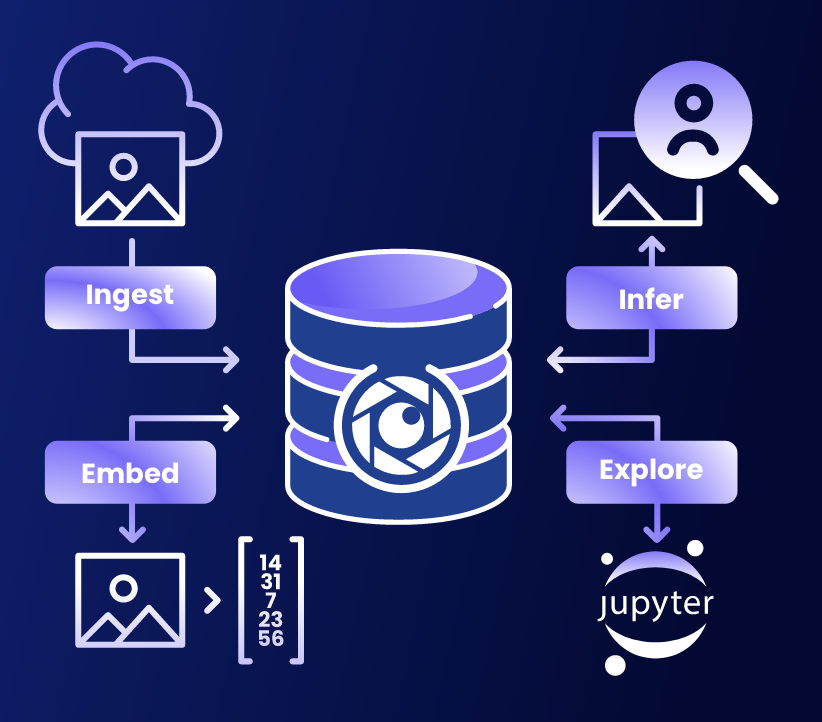
Depending on its goal, an AI workflow can include:
- Data ingestion and linking across modalities (text, image, video, embedding, etc.)
- Preprocessing and embedding using user-defined or built-in models or functions
- Storage and indexing for retrieval and filtering
- Inference steps for enriching data, powered by connected models or APIs
- Query interfaces optimized for speed, semantic depth, or interoperability
Workflows also provide a way for us to integrate with dataset and model providers like HuggingFace, OpenAI, Cohere, Twelve Labs, Together.ai, Groq, and others e.g. AIMon for RAG response monitoring and so on.
For business and technical use cases, motivation, future plan, you can refer to this blog.
Instantiating Workflows
There are three ways to use workflows:
- Workflows can be invoked from ApertureDB Cloud with a few clicks. This is the easiest way to use them, but there are a couple of restrictions: Not all options are available, and they can only be used with cloud instances.
- All workflows are also provided as Docker images, so they can be run from the command line or via Kubernetes. This is slightly harder to use, but some additional options are available, and they can be used with any ApertureDB instance.
- Workflows are implemented using an open-source Python script, so they can be modified to fit your needs, or reused in your own code. This is the most flexible way to use workflows, but it requires programming knowledge.
This documentation focuses on using workflows from ApertureDB Cloud. For more information on using workflows from the command line or in your own code, see the workflows documentation.
To create and delete workflows in ApertureDB Cloud, see Creating and Deleting Workflows.
Categories of Workflows
Ingest Data
First step to working with data is of course, ingesting data. You can start with some of our ready made dataset ingestion workflows if you just want to test ApertureDB features.
- Ingest Datasets: Ingest COCO or celebrity faces (celebA) dataset into ApertureDB with their images, annotations, and other metadata.
- Ingest Movie Dataset: Ingest a TMDB movies dataset into ApertureDB with movie actors, crew, posters, and embeddings to search on title, description and other information.
You can also ingest your own data into ApertureDB.
- Ingest from Bucket: Ingest your own images, videos or pdfs from an S3 or GS bucket.
- Ingest using MLCommons Croissant format: Ingest your own data with its metadata and relationships as expressed in an MLCommons Croissant file.
- Ingest from SQL: Ingest your own images, PDFs, and entities from a PostgreSQL database.
AI/ML/Search
Search, retrieval either require existing metadata or you can enhance the existing data with information such as embeddings, object detections from models or using tools like Label Studio.
- Generate Embeddings: Add embeddings or descriptors for uploaded images, videos, or PDFs for semantic search.
- OCR Text Extraction: Extract text from images (or image-only PDFs). Optionally generate embeddings.
- Detect Faces: Add bounding boxes for faces in uploaded images. Optionally generate embeddings
- Object Detection: Add labelled bounding boxes for objects in uploaded images.
- Label Studio: Run an instance of Label Studio to label and annotate your data for AI/ML workflows.
Plugins
For a development environment, agentic access, or compatibility with analytics / BI dashboards, we instantiate some common plugins as workflows as well.
- Jupyter Notebooks: Run a Jupyter server with access to your ApertureDB instance.
- MCP Server: Use the Model Context Protocol to connect a Generative AI to your ApertureDB instance.
- SQL Server: Create a SQL query interface wrapper for your ApertureDB instance.
Applications
Some workflows or rather end user applications / composite workflows combine ingestion to query as part of one workflow.
- Website ChatBot: Crawl a website, extract and segment the text, add embeddings, and finally run a RAG-based agent.
Periodicity
One-off workflows
One-off workflows are executed once and then stop. These are useful for tasks like ingestion. For example, you might want to ingest a dataset of images and their metadata into ApertureDB.
Periodic workflows
Periodic workflows are executed repeatedly, always picking up where they left off. These are useful for tasks that reprocess other data, for example to add embeddings and bounding boxes. As new data is added, the workflow will process it automatically. For example, you might want to add embeddings to images in ApertureDB. You can create a workflow that reads images from ApertureDB, computes embeddings, and writes those embeddings back to ApertureDB. The workflow will run continually, and it will process any new images that have been added since the last run.
Continuous workflows
Continuous workflows provide a server with access to an instance. These are useful for tasks where you want to be able to interact with a long-running service. For example, you might want to run a Jupyter server or an MCP server that has access to your ApertureDB instance.
Can You Add New Workflows?
Absolutely. ApertureDB workflows are designed to be extensible. You can:
- Clone and modify existing workflows
- Define new types and relationships
- Integrate custom models at any step
- Create composite workflows from primitive workflows
We welcome community workflow contributions for fast prototyping and sharing on our Github repository. Our workflow codebase contains many reusable pieces which we’ve assembled, making an already comprehensive set, and allows a new workflow to be created in under a day.