Download notebook · View source · Open in Colab
Building a RAG chain from Wikipedia
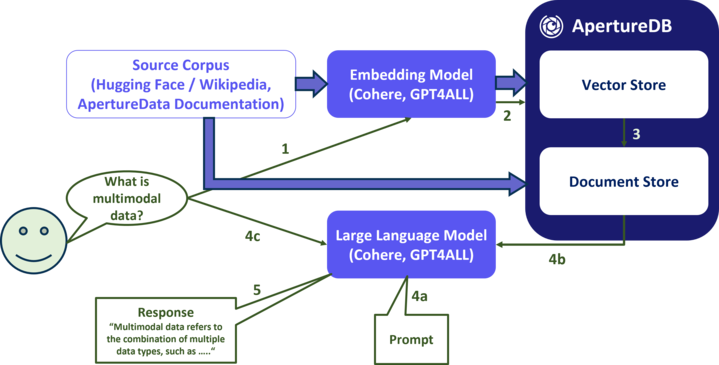
A retrieval-augmented generation (RAG) pipeline combines document retrieval with language-model generation. In this LangChain example, ApertureDB finds Wikipedia passages through vector search, and a language model uses those passages as context for an answer.
The example requires an existing corpus of more than 600,000 Simple English Wikipedia paragraphs with Cohere embeddings. Ingesting Wikipedia into ApertureDB describes how that corpus is loaded.
Install Dependencies
%pip install --quiet aperturedb langchain langchain-core langchain-community langchainhub langchain-cohere
Choose a prompt
The prompt combines retrieved source documents with the user's question and defines instructions for the language model.
from langchain_core.prompts import PromptTemplate
prompt = PromptTemplate.from_template("""You are an assistant for question-answering tasks. Use the following documents to answer the question. If you don't know the answer, just say that you don't know. Use three sentences maximum and keep the answer concise.  Additionally, you should always indicate which documents support each part of your answer.
Question: {question}
{context}
Answer:""")
print(prompt.template)
A second prompt sends the same question to the language model without retrieved documents, providing a comparison with the RAG response.
from langchain_core.prompts import PromptTemplate
prompt2 = PromptTemplate.from_template("""You are an assistant for question-answering tasks. Answer the question from your general knowledge.  If you don't know the answer, just say that you don't know. Use three sentences maximum and keep the answer concise.
Question: {question}
Answer:""")
print(prompt2.template)
Cohere API Key
The Cohere embedding and generation calls require a Cohere API key. Enter a key from the Cohere dashboard when prompted.
import os
from getpass import getpass

os.environ['COHERE_API_KEY'] = getpass()
Select an embedding scheme
The query embedding model must match the model used for the stored Wikipedia embeddings so that both vectors occupy the same search space.
from langchain_cohere import CohereEmbeddings
embeddings = CohereEmbeddings(model="embed-multilingual-v3.0")

emb = embeddings.embed_query("Hello, world!")
print(emb[:10], len(emb))
Select a vectorstore
The vector store connects to the ApertureDB instance containing the Wikipedia passages and their embeddings.
Connect to ApertureDB
This example accepts the database connection settings as a JSON string. The configuration reference describes the required fields and other supported connection methods.
! adb config create --from-json --active
Create vectorstore
The LangChain vector-store object connects retrieval operations to the existing ApertureDB corpus.
from langchain_community.vectorstores import ApertureDB
import logging
import sys
# date_strftime_format = "%Y-%m-%y %H:%M:%S"
# logging.basicConfig(stream=sys.stdout, level=logging.WARN,
#                     format="%(asctime)s %(levelname)s %(funcName)s %(message)s", datefmt=date_strftime_format)

DESCRIPTOR_SET = "cohere_wikipedia_2023_11_embed_multilingual_v3"

vectorstore = ApertureDB(embeddings=embeddings,
                 descriptor_set=DESCRIPTOR_SET)
Create a retriever
The retriever searches for passages related to the question. For each query, it fetches up to 100 candidates and selects 10 using maximal marginal relevance (MMR), which balances similarity to the query with diversity among the selected passages.
search_type = "mmr" # "similarity" or "mmr"
k = 10              # number of results used by LLM
fetch_k = 100       # number of results fetched for MMR
retriever = vectorstore.as_retriever(search_type=search_type,
    search_kwargs=dict(k=k, fetch_k=fetch_k))
Select an LLM engine
Cohere supplies the language model in this example. The generation model can come from a different provider than the embedding model.
The example uses command-r-08-2024 for generation.
from langchain_cohere import ChatCohere

llm = ChatCohere(model="command-r-08-2024")
Build the chain
The chain retrieves passages from ApertureDB, combines them with the question in the prompt, and asks the language model to generate an answer. The example prints the retrieved passages so the context supplied to the model is visible.
from langchain_core.runnables import RunnablePassthrough, RunnableParallel
from langchain_core.output_parsers import StrOutputParser

def format_docs(docs):
    return "\n\n".join(f"Document {i}: " + doc.page_content for i, doc in enumerate(docs, start=1))


rag_chain = (
    RunnablePassthrough.assign(context=(lambda x: format_docs(x["context"])))
    | prompt
    | llm
    | StrOutputParser()
)

rag_chain_with_source = RunnableParallel(
    {"context": retriever, "question": RunnablePassthrough()}
).assign(answer=rag_chain)
The comparison chain sends the question to the language model without retrieving documents.
plain_chain = (
  {"question": RunnablePassthrough()}
    | prompt2
    | llm
    | StrOutputParser()
)
Look at some documents
This query returns a page of stored passages ordered by title, showing the text available to the retriever.
from aperturedb.CommonLibrary import create_connector

offset = 0
query = [{"FindDescriptor": {
    "set": DESCRIPTOR_SET,
    "results": {"list": ["text", "lc_title"]},
    "offset": offset,
    "sort": "lc_title",
    "limit": 10
}}]
client = create_connector()
response, _ = client.query(query)
assert isinstance(response, list) and response[0]["FindDescriptor"]["status"] == 0, response
for i, result in enumerate(response[0]["FindDescriptor"].get("entities", []), start=1):
    print(f"{i}. {result['lc_title']}: {result['text']}")
Run the chain
The same question is sent through the RAG and comparison chains. Their outputs show the answers generated with and without retrieved context.
from IPython.display import display, Markdown

def run_query(user_query):
    display(Markdown(f"### User Query\n{user_query}"))

    nonrag_answer = plain_chain.invoke(user_query)
    display(Markdown(f"### Non-RAG Answer\n{nonrag_answer}"))

    rag_answer = rag_chain_with_source.invoke(user_query)
    display(Markdown("\n".join([
        f"### RAG Answer\n{rag_answer['answer']}",
        f"### Documents",
        *(f"{i}. **[{doc.metadata['title']}]({doc.metadata['url']})**: {doc.page_content}" for i, doc in enumerate(rag_answer["context"], 1))
    ])))


user_query = input("Enter a question:")
assert user_query, "Please enter a question."
run_query(user_query)
What's Next?
Ingesting a Website into ApertureDB builds a RAG corpus from pages collected by a web crawler.